Dissecting the PE File (Part 2): What the Windows Loader Actually Cares About
This is a continuation of the Part 1, Where we dissected the PE file Starting from the DOS header and stopping right before we could explore the Optional Header in full, if you have not read that yet, you can find it here:
Dissecting the PE File (Part 1): What the Windows loader Actually Cares About.
I approached this part the same way i did the previous one, by opening a raw Windows binary and making sense of the file structure directly, guided by the Microsoft PE format documentation. Rather than treating the format as static theory, I modified specific values and observed how the Windows loader responded, focusing on what it actually validates, relies on during execution or completely ignores.
The goal is not to document every field, but to get a practical understanding at a low level which parts of the PE file meaningfully influence loader behavior.
Re-entering the File: The Optional Header
At the end of part 1, we arrived at the NT headers and stopped just before the Optional Header. That is where the Windows loader transitions from identifying a PE file to deciding how to load it.
Despite the name, the Optional Header is not optional for executable images, it is called Optional because some files do not have it, but absolutely compulsory for executable images as you will find in this post. This structure contains the values the loader uses to map the image into memory, locate code and data, apply relocations, and determine where execution begins.
in order to get a full understanding of this section, we return to the file exactly as the loader sees it, raw bytes on disk.
Note: In part1, notepad.exe was used as the reference binary. For the experiments in this part, Putty.exe is used instead. This does not affect the Observations, as they reflect Windows behavior which is not application-specific.
The SizeOfOptional Header in this binary is still F0 00 -> 0x00F0 -> 240 bytes
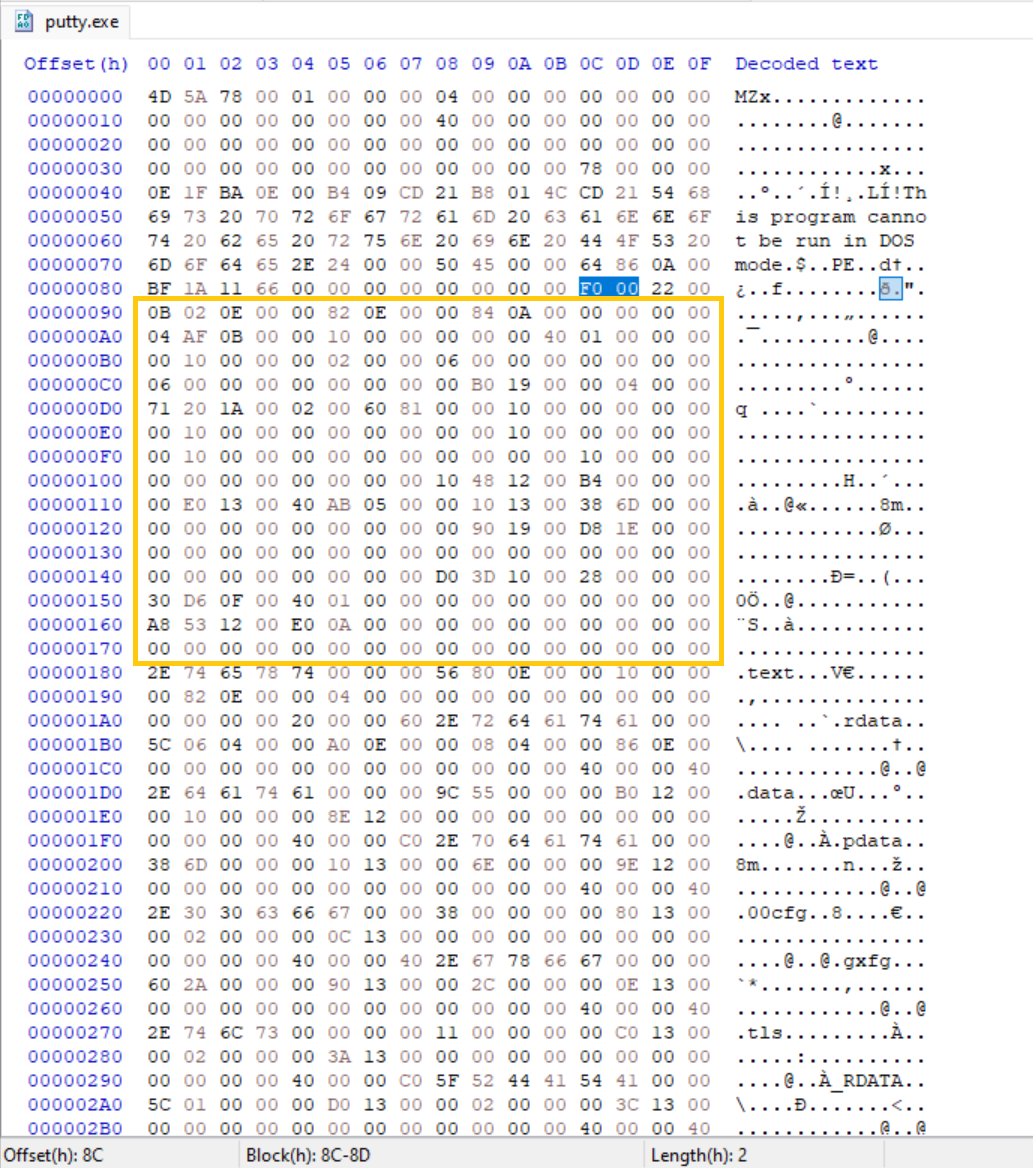 Raw bytes of the entire Optional Header
The size of the Optional Header is not fixed, in this post our test application, Putty.exe has 240 bytes as stated in the SizeOfOptionalHeader field, We can break this down field by field using the Windows PE documentation.
Magic
Bytes: 02 0B → 0x20B
This field indicates the PE format type.
0x20B denotes a PE32+ (64-bit) executable, while 0x10B denotes PE32 (32-bit).
Experiment: Altering the Magic Value
The Magic value was modified from 0x20B (64-bit) to 0x10B (32-bit) while keeping the rest of the file unchanged.
Observed behavior:
- The Windows loader rejects the image during load with an error
This app can't run on your PC To find a version for your PC, check with the software publisher - The executable fails before reaching the entry point
- No user-mode code executes
This indicates that the Magic field is validated early and must match the actual binary layout.
Major Linker Version
Bytes: 0E -> 14
Minor Linker Version
Bytes: 00-> 00
These fields store the linker version used to produce the binary (e.g., MSVC 14.00). They are not validated by the Windows loader and modifying them does not affect loading or execution. They primarily exist for tooling and diagnostic purposes.
SizeOfCode
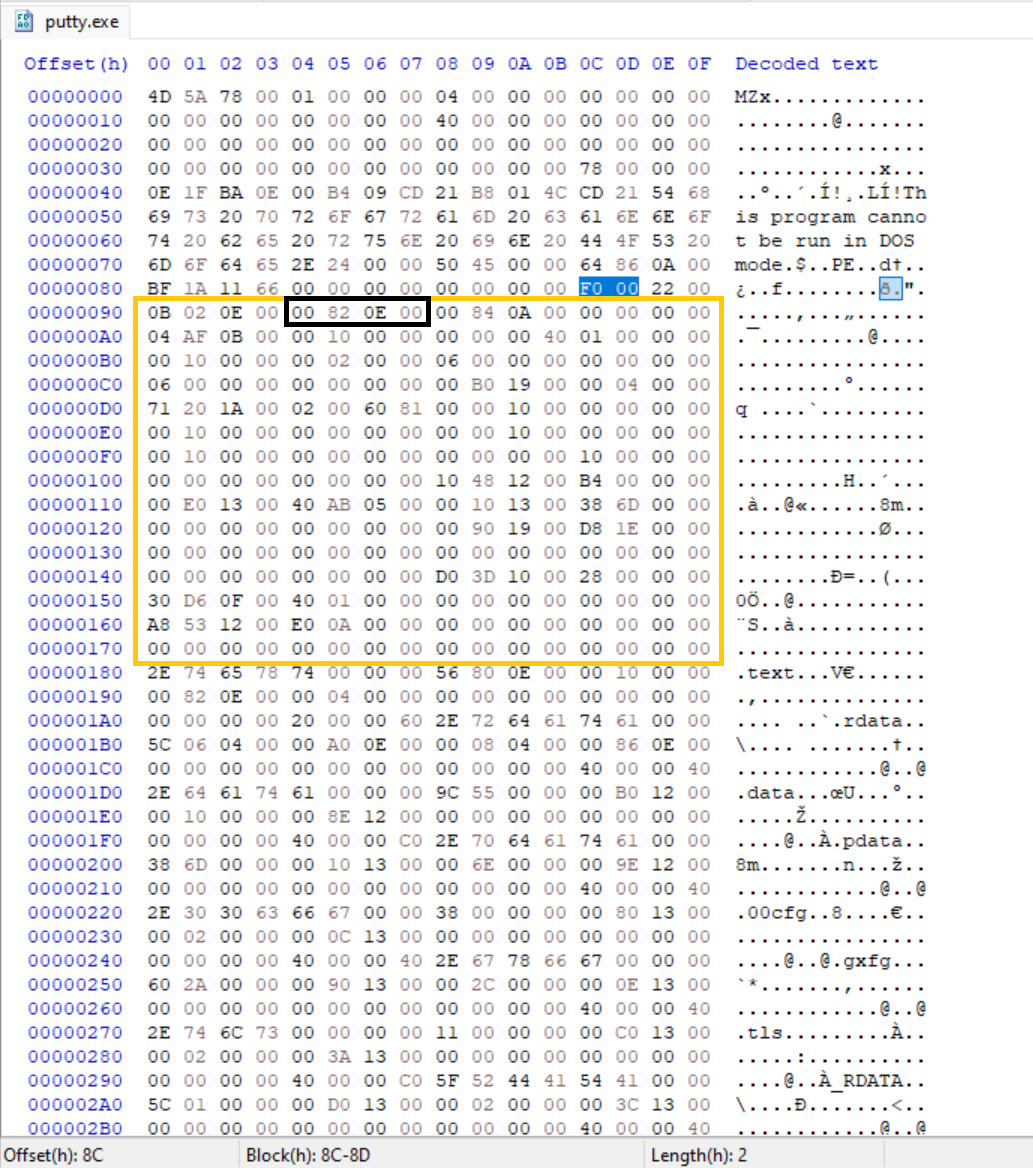 Raw bytes of the SizeofCode Highlighted in a black box
Bytes: 00 82 0E 00 -> 00 0E 82 00 -> 950,784
According to the Microsoft documentation “The size of the code (text) section, or the sum of all code sections if there are multiple sections. “ This means there could be multiple executable code section. This is the size of all sections that are marked as executable code on disk or in memory.
The SizeofCode field was modified to both smaller and larger values while leaving section headers unchanged.
Observed behavior:
- Image Loads successfully
- Code executes normally
- No loader error occurs
This indicates the loader does not rely on this field as it appears to be ignored by the user-mode loader in modern Windows for ordinary executables.
Packers / Protectors like PELock, Themida and VMProtect have been known to often tamper with or set this to 0 / very small or very large to hinder static analysis or reverse engineering tools
SizeOfInitializedData
Bytes: 00 84 0A 00 -> 00 0A 84 00 -> 689,152
Initialized data means data (usually global and static variables that the programmer explicitly gave a value to.) that are given an explicit starting value before (or at the moment) the program begins running. This section contains the sum of all such data.
The SizeOfInitializedData field was modified to a large value and later set to 0 while leaving section headers unchanged.
Observed behavior:
- Image Loads successfully
- Code executes normally
- No loader error occurs
This section is purely informational.
SizeOfUninitializedData
Bytes: 00 00 00 00
In contrast to initialized data, Uninitialized data are usually variables that has no specific starting value set by the programmer.
This Field is purely informational
AddressOfEntryPoint
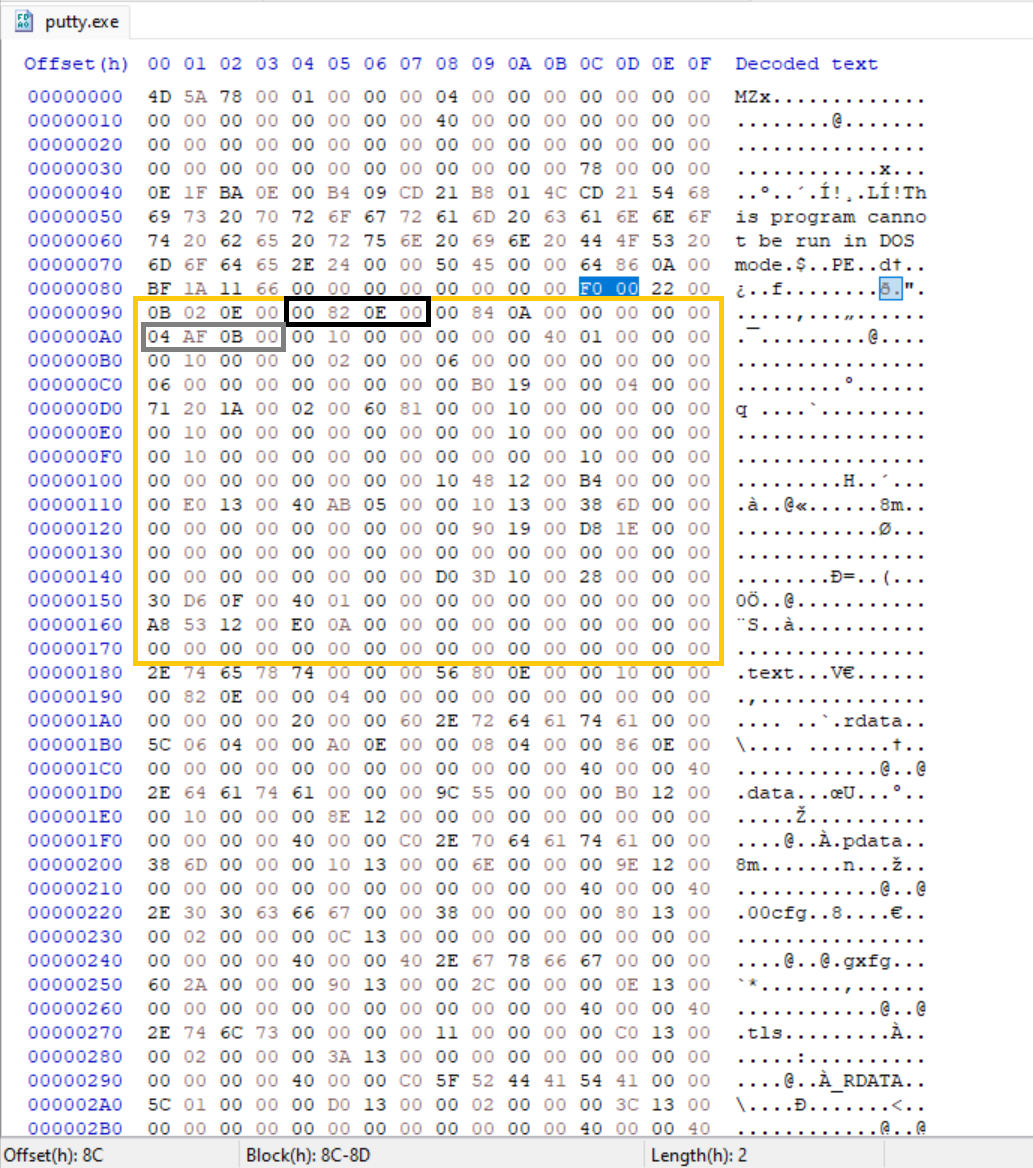 Raw bytes of the AddressOfEntryPoint Highlighted in a gray box
Bytes: 04 AF 0B 00 -> 00 0B AF 04 -> 0x000BAF04
For executables this is the address of the first instruction relative to the image base when the image is loaded. Unlike several Optional Header fields examined so far the AddressOfEntryPoint is directly used by the Windows loader to transfer control to the image, this points directly to where the image code starts which is usually a Main. EntryPoint is optional for DLLs. This is one of the most security-related fields in the Optional Header and a common target for packers, protectors and loaders.
Jumping to the AddressOfEntryPoint using HxD. it lands directly within the code section 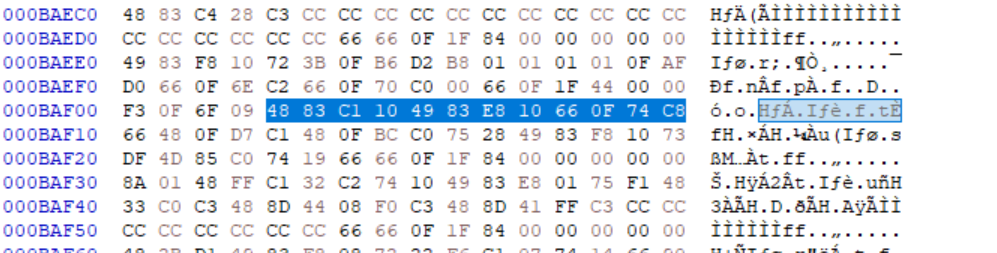 Raw bytes at Entry Point Address stored in the AddressOfEntryPoint
The AddressOfEntryPoint was modified to Observe loader behavior
Observed behavior:
Modifying this value to 00 00 00 00:
- Program does nothing when doubleClicked, When Observed with Process Explorer tool, Program starts and simply exits
This makes sense as after parsing the loader could not find a start address to pass execution to the executable.
Modifying this value to different address within the code section 0x000BB140 -> 40 B1 0B 00:
- Program does not display a visible error, When Observed with Process Explorer tool, Program starts and simply exits
Modifying this value to point outside of the executable sections results in immediate termination of the process, While redirecting it to a valid executable code alters the execution flow
In these cases the loader successfully maps the image, but execution returns immediately due to invalid or unreachable startup code.
This means the AddressOfEntryPoint is important to the Loader.
Injecting new code and abusing EntryPoint for payload execution is covered future posts.
BaseOfCode
Bytes: 00 10 00 00 -> 00 00 10 00
This is the Relative Virtual Address (RVA) of the beginning of the executable code area in a Windows PE File. it tells you immediately where the actual instructions begin. This is similar for most values because the Code section usually starts right after the PE headers which is often padded to 0x1000 for alignment reasons.
The Base of code was modified to observe loader behavior
Observed behavior:
- Image Loads successfully
- Code executes normally
- No loader error occurs
I expected modifying the BaseOfCode to affect execution. Surprisingly setting it to 0 or an exaggerated value had no impact on loading or runtime behavior. This confirms the Windows loader does not rely on this field when mapping executable code.
BaseOfData
Bytes: 00 00 00 40 -> 40 00 00 00
This Header is only present in the x32 binaries, this is one of the differences between a x32 and x64 binary file. This is the RVA to the data section.
This Header is completely absent from our test binary as this is 64-bit file.
ImageBase
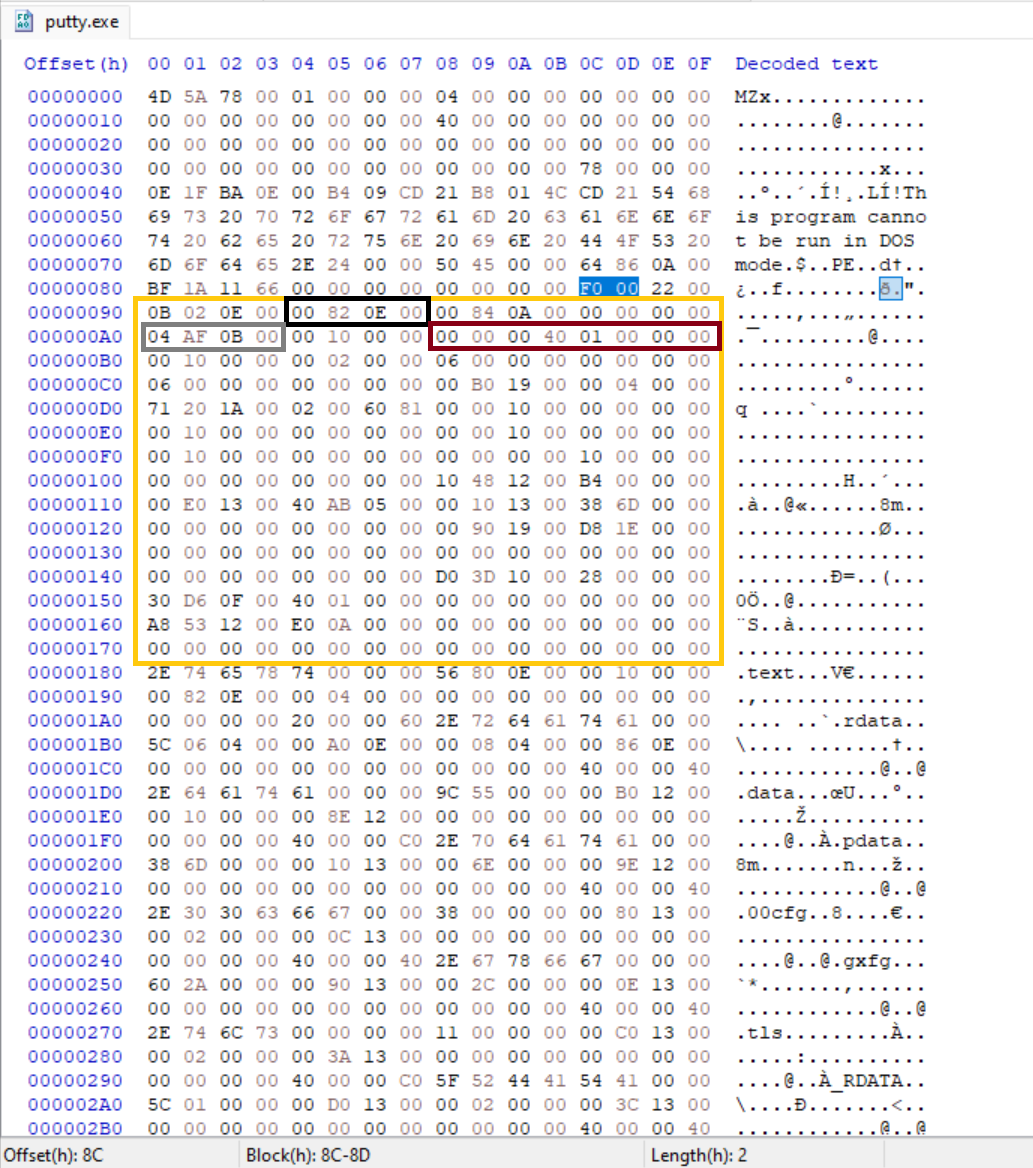 Raw bytes of the ImageBase highlighted in a Dark red box
Bytes: 00 00 00 40 01 00 00 00 -> 00 00 00 01 40 00 00 00 -> 0x14000000
This field is 4 bytes long on x32 and 8 bytes on x64. It is the preferred address where the Windows loader tries to map the executable image in memory. in reality the image is usually loaded elsewhere due to Address Space Layout Randomization (ASLR) for security. The loader fixes all absolute addresses embedded in the code or data using a mechanism called Base relocation.
This value was modified to test the loader behavior
Observed behavior: 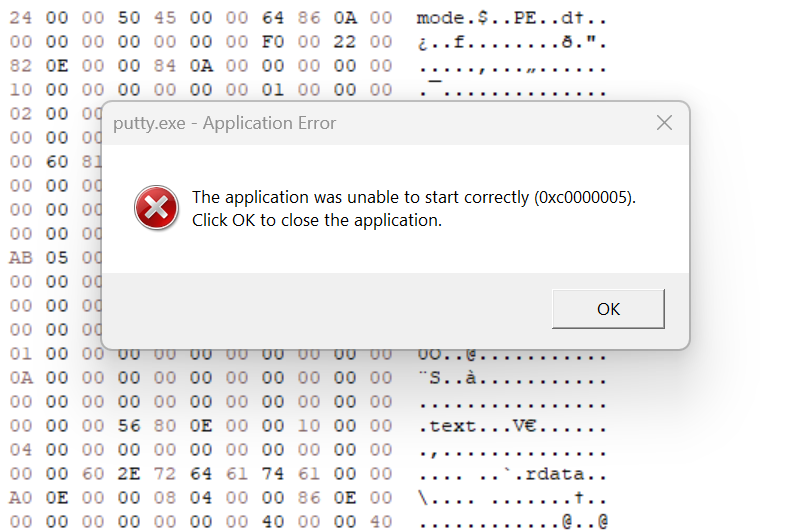 Application displaying a visible error when ImageBase was Modified
- The Image fails to start and display a visible error (0xc0000005), which stands for Access Violation in Windows. (Likely due to relocation failure when the preferred base is unavailable and no/.reloc directory present or DYNAMIC_BASE cleared.)
This field is clearly validated early and participates in image mapping. Incorrect values can cause loader failure depending on relocation availability and policy.
SectionAlignment
Bytes: 00 10 00 00 -> 00 00 10 00 -> 4096
This defines the boundary on which each section starts when the Image is loaded in memory, This defaults to the typical hardware page size (4096 bytes) because memory is managed in pages. SectionAlignment must be greater than or equal to FileAlignment When SectionAlignment is greater than the page size (4096), If the SectionAlignment is less than the architecture’s page size, then FileAlignment must match SectionAlignment.
This field was modified to a value lower than the fileAlignment
Observed behavior:
The Field was modified to 0, an exaggerated value and then to 00 02 00 00 to match file Alignment in all cases the loader behaved the same.
- The Windows loader rejects the image during load with an error
This app can't run on your PC To find a version for your PC, check with the software publisher - The executable fails before reaching the entry point
- No user-mode code executes
The SectionAlignment field is verified early by the Windows loader.
FileAlignment
Bytes: 00 02 00 00 -> 00 00 02 00 -> 512
This defines the boundary on which raw section data starts in the PE file on disk. According to the Microsoft PE Format documentation “The value should be a power of 2 between 512 and 64 K, inclusive. The default is 512. If the SectionAlignment is less than the architecture’s page size, then FileAlignment must match SectionAlignment.”
This field was modified to a value lower than the fileAlignment and then to 0.
Observed behavior:
This field was modified to 00 00 00 00:
- The Windows loader rejects the image during load with an error
This app can't run on your PC To find a version for your PC, check with the software publisher
This field was modified to 00 10 00 00:
- Image Loads successfully
- Code executes normally
This field was modified to 00 20 00 00 greater than SectionAlignment:
- The Windows loader rejects the image during load with an error
This app can't run on your PC To find a version for your PC, check with the software publisher
MajorOperatingSystemVersion
Bytes: 06 00 -> 00 06
MinorOperatingSystemVersion
Bytes: 00 00
This field refers to the Major and Minor version number of the required Operating System, They are compatibility hints in this case the version is 6.0 which is the Windows Vista, this fields are not enforced.
MajorImageVersion
Bytes: 00 00
MinorImageVersion
Bytes: 00 00
These fields indicate the self reported version of the Image or DLL. They are primarily informational and used for:
- Version comparison / compatibility checks (rarely enforced by the loader today).
- Debugging & identification
- Installer / updater logic — some installers compare this to decide if an update is needed.
MajorSubsystemVersion
Bytes: 06 00 -> 00 06
This field tells the Windows loader the minimum Major Windows subsystem version the image claims it was built for.
Observed behavior:
Although often documented as informational, MajorSubsystemVersion is explicitly validated by the Windows loader. Values below NT 4.0 or above OS recognized range cause the image to be rejected during load with compatibility error. Within the accepted range, the value has no observable impact on execution, indicating the field is used as policy gate rather than a functional configuration.
Internally this value is checked against the subsystem version range supported by the running kernel, not the user-visible Windows version.
MinorSubsystemVersion
This field tells the Windows loader the minimum Minor Windows subsystem version the image claims it was built for.
Bytes: 00 00
This field was modified to various values
Observed behavior:
- Image Loads successfully
- Code executes normally
Win32VersionValue
Bytes: 00 00 00 00
According to the Windows PE Format Documentation “The field Reserved, must be zero. “. Changing the value does not affect execution.
SizeOfImage
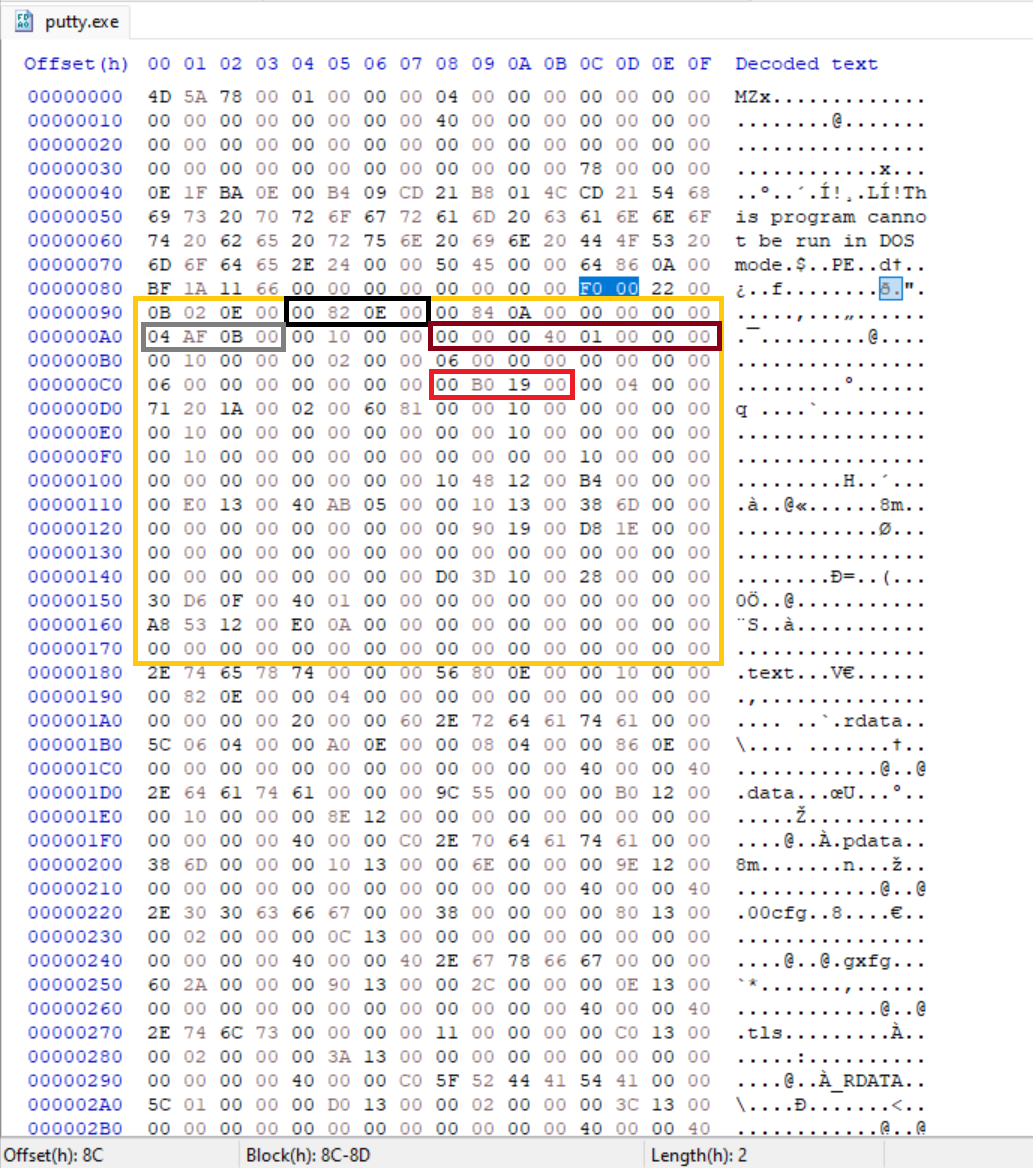 Raw bytes of the sizeOfImage highlighted in a red box
Bytes: 00 B0 19 00 -> 00 19 B0 00 -> 1,683,456
This is the total size of the image file, including the all Headers when loaded into memory rounded up to sectionAlignment.
This Value was modified to Observe loader behaviour.
Observed behavior:
This value was modified to 0 and then to an exaggerated value way bigger than the actual size, the results were the same:
- Image Loads successfully
- Code executes normally
This value was modified below the original size of the image:
- The Windows loader rejects the image during load with an error
This app can't run on your PC To find a version for your PC, check with the software publisher
This suggests the loader only validates this field as a lower bound. Further investigation is left for later.
Some AV/EDR cross-check against real mapped size now, but loader itself is lenient upward.
SizeOfHeaders
Bytes: 00 04 00 00 -> 00 00 04 00 -> 1024
The combined size of an MS-DOS stub, PE header, and section headers rounded up to a multiple of FileAlignment.
Observed behavior:
- The Windows loader rejects the image during load with an error
This app can't run on your PC To find a version for your PC, check with the software publisher
This field is verified early and the Windows loader relies on this field to load the image successfully
CheckSum
Bytes: 71 20 1A 00 -> 00 1A 20 71
This field is ignored unless the image is a critical system file.
Modifying the checksum in this binary had no effect. image loaded successfully, However Tampering with CheckSum in a driver or critical DLL would indeed prevent execution as a security measure
Malware / Packers / Droppers often leave CheckSum invalid (0 or mismatched) because they modify the file without recalculating. This is a very reliable IOC ~80–90% of malware shows bad checksums vs. ~10% of clean files.
Subsystem
Bytes: 02 00 -> 00 02
The Subsystem field determines which Windows subsystem (if any) is required to run the image.
Here are the common Windows Subsystem values
Observed behavior:
Value was modified to 01:
- Image Failed to load with visible error “Application cannot be run in Win32 mode.”
Value was modified to 03:
- Image started with a visible cmd console in the background
Anything above 03 fails to load with the error “Application cannot be run in Win32 mode.”
Subsystem is a small but important loader hint that mainly controls console allocation for user-mode apps and gates execution for drivers/native code.
DllCharacteristics
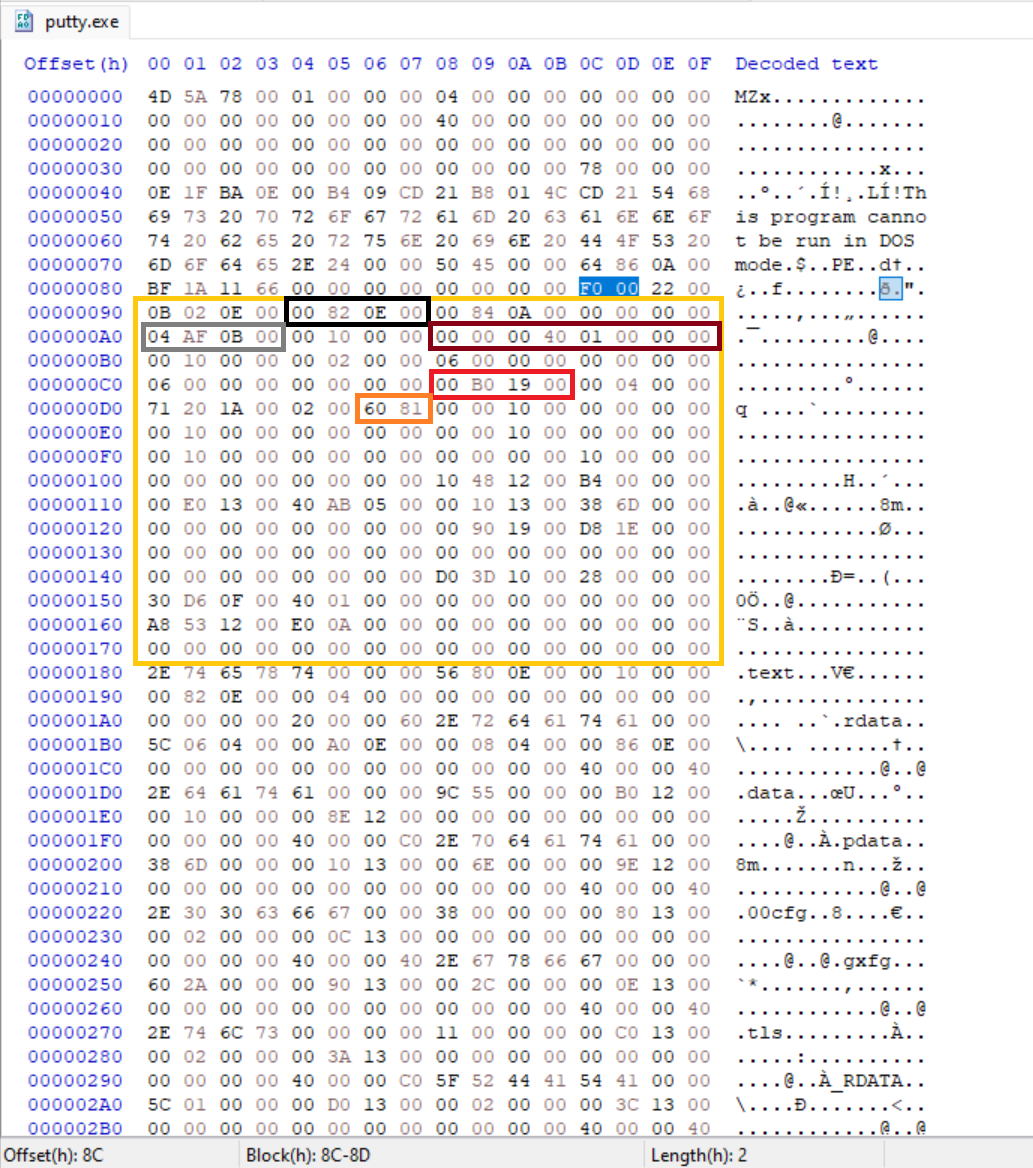 Raw bytes of the DllCharacteristics highlighted in a Orange box
Bytes: 60 81 -> 81 60-> 0x8160
This field is a bitmask that describes security and loader-enforced behavior for the image. Unlike many Optional Header fields that are informational, several flags inside DllCharacteristics are explicitly checked and enforced by the Windows loader.
You can find the list of DllCharacteristics here and their flags.
Common flags present in this binary include:
- IMAGE_DLLCHARACTERISTICS_DYNAMIC_BASE: Enables ASLR (Image can be relocated).
- IMAGE_DLLCHARACTERISTICS_NX_COMPAT: Marks the image as compatible with DEP (non-executable memory enforcement).
- IMAGE_DLLCHARACTERISTICS_HIGH_ENTROPY_VA: Allows higher entropy ASLR on 64 bit systems.
IMAGE_DLLCHARACTERISTICS_TERMINAL_SERVER_AWARE: Indicates awareness of terminal services / multi-session environments.
- No DYNAMIC_BASE → no ASLR (if system allows) → easier ROP
- No NX_COMPAT → DEP opt-out (rarely works on x64 anymore)
- CFG bit (0x4000) absent → no Control Flow Guard even if system enables it
But again, system policy can override (especially enterprise/GPO forced mitigations).
You can see the effective mitigations in process explorer by right-clicking the process → Properties → Image tab
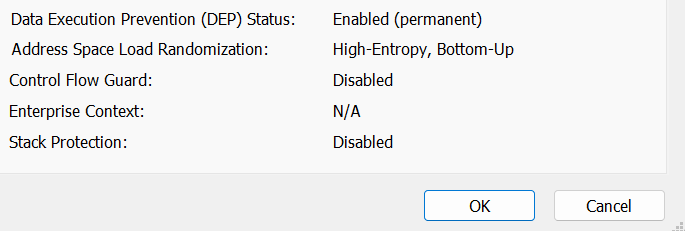 Process Explorer showing effective mitigations for the unmodified image
This field was modified to remove some of these protections
Observed behavior:
Although DllCharacteristics contains flags for DEP, ASLR and other mitigations, some of the effective protections applied to a process are ultimately decided by the Windows loader and system policy.
Even when all flags were cleared (DllCharacteristics = 0x0000)
- DEP remained enabled (Permanent), Permanent DEP is basically always on for 64-bit processes since ~Win8/10 regardless of /NXCOMPAT flag.
- ASLR remained enabled but the High Entropy was turned off and it has a “disabled” next to it
Enabled(permanent)Disabled. - CFG remained disabled
- Stack Protection remain disabled
This demonstrates that DllCharacteristics expresses image intent, while the final mitigation state is the result of loader logic combined with system-wide policy.
Takeaway
The OptionalHeader is not a configuration block, it is a mix of hard validation rules, policy gates, and historical metadata. Understanding which fields the loader enforces versus which it merely tolerates is critical for both malware development and defensive analysis.
In Part 3, we’ll move past validation and into process initialization, covering stack/heap reservation, loader flags, and finally data directories, where imports, relocations and TLS fundamentally change how an image behaves at runtime.