Dissecting the PE File (Part 1): What the Windows Loader Actually Cares About
The goal of this research/blog post is to understand, at a low level, what a PE file actually is, piece by piece. This is Part 1, focused on the PE headers and loader-relevant structures, stopping before the Optional Header is explored in detail.
Introduction
The Portable Executable is the standard file format for all Windows executables, EXE, DLLs, SYS drivers and even some malware loaders and shellcode stagers. The PE format is basically just the structured map of executables and object files under the Windows operating system.
It contains things like:
- Where the code starts.
- Which DLL it needs
- Where to place each section in memory
- Relocations for rebasing
- Import table for resolving API
- Resources (icons, strings, dialogs)
- Digital Signature
- Thread Local Storage.
- Exception Tables
- Metadata
- Certificate Information.
Windows reads the headers, allocates memory, maps section, resolves import, applies relocation and finally calls the entry point.
For attackers and malware developers:
The PE format defines where you can hide, patch, hook, inject, parse, override, or abuse something. For defenders:
The same structure reveals red flags, anomalies, and manipulations performed by loaders, packers, and malware families.
Understanding these structures is essential for malware development, manual loading, unpacking, and detecting malformed or evasive binaries.
Primary Reference
Microsoft PE/COFF Specification
How I Approached Learning the PE Format
To make this stick for me i try to understand by opening up some real-world binaries. The approach was simple
- I opened up several EXE and DLL files in a hex editor (HxD)
- I used PE-bear/ CFF Explorer to cross-check signatures
- Matched everything I saw against the Microsoft PE/COFF specification, field by field.
- Wrote a basic parser to understand parsing the headers and programmatically changing some values.
With that groundwork, we can now walk through what each header and structure looks like in reality.
High-Level Layout of a PE File
- Dos Header (MZ) -
- Dos Stub -
- PE Signature (PE\0\0) -
- COFF File Header -
- Optional Header -
- Section Headers -
- Sections [
- .text => Executable Code
- .data => Initialized Data
- .rdata => Read-Only Initialized Data
- .bss => Uninitialized Data (often zero-sized on disk)
- .pdata => Exception Handling Data
- .reloc => Relocation Table
- .idata => Import Address Table
- .edata => Export Address Table
- .rsrc => Resources (icons, metadata)
- .tls => Thread Local Storage ]
DOS Header and Stub
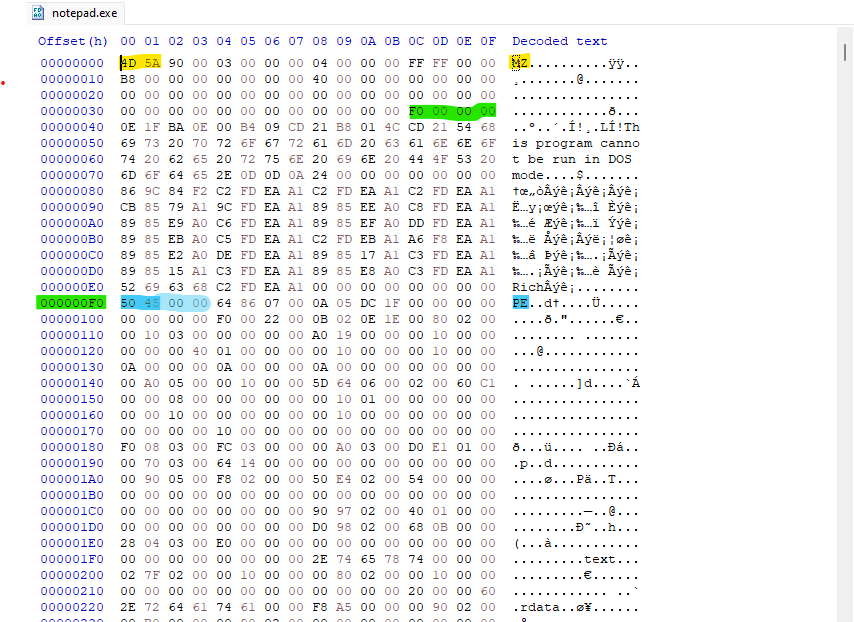 Figure-1.1 Notepad opened with HxD
The first two bytes highlighted in yellow, 4D 5A, represents the MZ signature (name after Mark Zbikowski). This value immediately identifies the file as a Windows executable. in the decoded text view, you’ll notice the classic message:
1
	This program cannot be run in DOS mode
This is just for backwards compatibility. Modern Windows doesn’t use it, and many packers remove or replace it. You can even customize this message using the /STUB option or edit it directly in tools like CFF Explorer.
Locating the PE Header (e_lfanew)
According to the Microsoft PE/COFF specification, the offset to the PE header is stored at file offset 0x3C inside the DOS header. This field is called e_lfanew, and it’s a 4-byte little-endian value.
In the Figure-1.1 above (highlighted in green), you can see the value stored at 0x3C.
Because it’s little-endian the bytes appear in reverse order, but represents a single 32-bit number. so the value F0 00 00 00, means e_lfanew is 0x000000F0, Jumping to address 0xF0 in HxD, I landed on the PE Signature:
1
50 45 00 00 ==> PE\0\0
This confirms the start of the PE header.
COFF File Header
In the Microsoft PE format documentation right after the PE Signature comes the COFF File Header, It is the first structure interpreted after the PE signature and where Windows begins to understand what kind of binary it’s dealing with.
I Opened up notepad.exe in HxD and right after the PE Signature the next 20 elements look like this
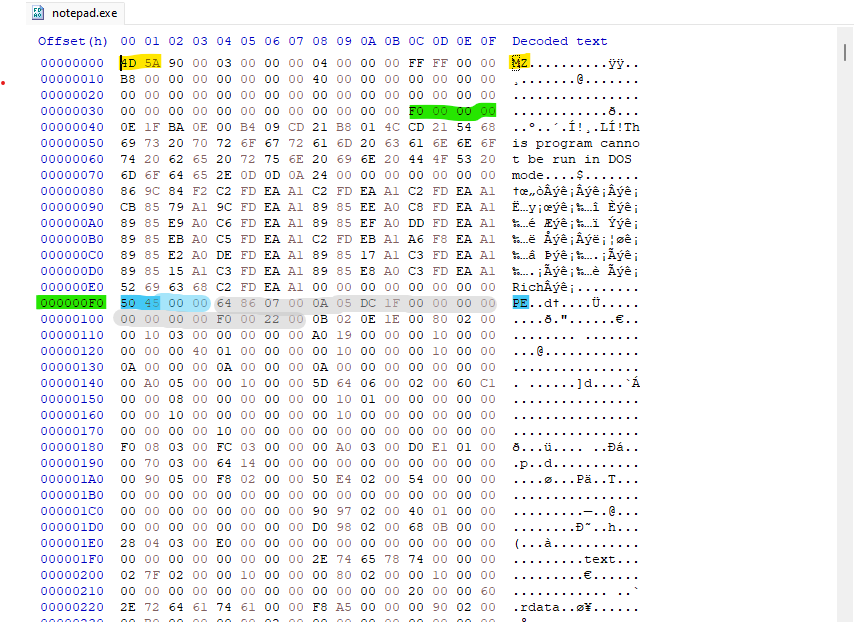 Figure-1.2 Notepad COFF File Header
The next 20 bytes highlighted in grey right after the PE Signature, makes up the entire 20-byte COFF header.
1
64 86 07 00 0A 05 DC 1F 00 00 00 00 00 00 00 00 F0 00 22 00
The COFF File header is always a fixed 20 bytes, it can be easily broken down field by field using the Microsoft documentation:
Machine
Bytes: 64 86 => 0x8664
Meaning: IMAGE_FILE_MACHINE_AMD64
This tells the Windows this is a 64-bit executable.
NumberOfSections
Bytes: 07 00 => 0x0007
Tells the loader how many section headers to expect.
TimeDateStamp
Bytes: 0A 05 DC 1F => 0x1FDC050A
This Indicates when the file was created, can be modified easily by packers or by hand, can be used in malware clustering, timeline analysis or version tracking.
PointerToSymbolTable
Bytes - 00 00 00 00
NumberOfSymbols
Bytes - 00 00 00 00
These are typically used for debugging symbols in COFF header, they are always zero in compiled executables.
SizeOfOptionalHeader
Bytes: F0 00 => 0x00F0
This specifies the size in bytes of the Optional Header that follows
Characteristics
Bytes: 22 00 => 0x0022
Bitfield breakdown:
- 0x0002: IMAGE_FILE_EXECUTABLE_IMAGE (valid executable image)
- 0x0020: IMAGE_FILE_LARGE_ADDRESS_AWARE (application can handle >2 GB addresses)
These are standard flags for most modern 64-bit Windows executables like notepad.exe.
This is how the Windows loader interprets these bytes, it now has enough information to proceed to the Optional Header, which is the most important part of the PE Structure.
Optional Header (Why it Matters)
The Optional Header starts right after the COFF File header and it size is defined by the SizeOfOptionalHeader field in the COFF header in my notepad binary this value is
1
0x00F0 -> 240 bytes
The bytes inside the gold box (240 bytes) is the full Optional Header for this PE File.
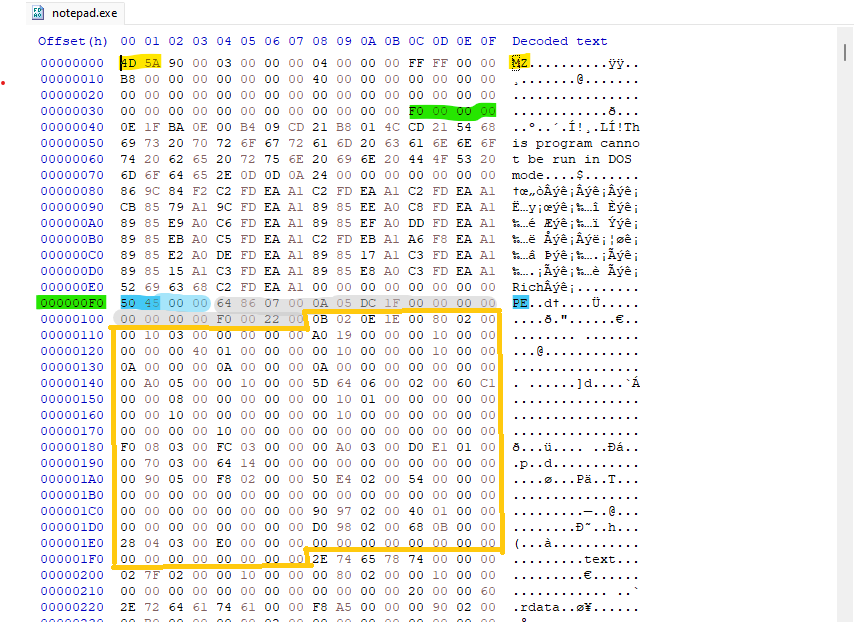 Figure-1.3 Notepad Optional Header
Even though it’s called “Optional” every executable file has one. it’s one of the most frequently parsed parts of the PE file by both the OS Loader and Reverse engineering tools.
There are some differences in structure between the PE32 and PE32+, The PE32+ removes some fields and increases others, but the Optional Header always defines how the image is loaded and executed.
This concludes Part 1 of the PE anatomy series.
At this stage, we’ve covered:
The DOS header and stub
Locating the PE header using e_lfanew
The PE signature
The COFF File Header and its role in loader decisions.
In Part 2, the focus shifts to the Optional Header. This is where loader behavior becomes more flexible and small changes can dramatically alter execution.
That’s also where controlled experiments begin.